Trucking Company & Driver Registration Guide
Step 1: Register with UIIA
All trucking companies must register with UIIA before accessing the terminal.
- Go to: www.uiia.org
- Complete the registration process
What is UIIA?
UIIA is an industry agreement that allows trucking companies to exchange equipment with ocean carriers, railroads, and leasing companies.
Step 2: Wait for Your SCAC Code Approval
- National Motor Freight Traffic Association will assign your company a SCAC code
- Processing time: Up to 2 weeks
Your company must be active in APM’s system before moving forward
Check status: mobcs@apmterminals.com
Step 3: Request TermPoint Access
Once your company is active:
- The owner or dispatcher must email: TSC@apmterminals.com
- Request TermPoint login credentials (appointment system)
Step 4: Add Drivers & Trucks
In TermPoint:
- Go to the "Trucks and Drivers" tab
- Add all driver and truck information
Step 5: Driver App & Badge Pickup
Each driver must:
- Download the Stowlog App
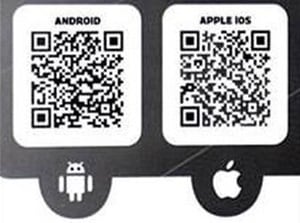
- Complete setup in the app
- Pick up a badge at:
901 Ezra Trice Blvd
Mobile, AL 36603
Help: mobcs@apmterminals.com
Step 6: TWIC & Safety Training Requirements
Before scheduling an appointment, drivers must meet these requirements:
Training Requirement
Complete Basic Safety, Security & Environment Training
TWIC Requirement
You must have a valid TWIC card (physical card required)
Apply or get info:
www.twicprogram.tsa.dhs.gov
Important TWIC Rules (Read Carefully)
- TWIC receipts are NOT accepted to extend expiration dates
- This applies to:
- First-time badge holders
- Drivers who have not visited the terminal in over 1 year since their last TWIC expiration in our system
- A physical TWIC card is required to create a Stowlog account
Upload Required Documents in Stowlog
ALL Drivers must upload:
- TWIC Card
Additional Requirements by Role
ILA Workers (must have TWIC +):
- State-issued Driver’s License, OR
Alabama State Port Authority ID, OR
Valid U.S. Passport - Local Union Card (with badge number)
OTR Drivers / Vendors (must have TWIC +):
- State-issued Driver’s License
- Proof of Insurance
- Vehicle License Plate Number
Step 7: Schedule an Appointment
- Dispatchers must schedule in TermPoint
- No appointment = No entry
Ask APM for tutorial if needed
Step 8: Arrival Time Rules
- Arrive no earlier than 30 minutes before your appointment
- Must be Orange Pass member to enter at 7am
Early arrivals will be turned away
Step 9: Review Safety Rules
Drivers must review all safety guidelines before arrival:
Available on the APM Terminals website: Safety - APM Terminals
Step 10: Follow Yard Safety Signals
While in the yard:
- Keep your window slightly open
- Follow horn signals from operators:
Signal Meaning 1 beep STOP 2 beeps BACK UP
Quick Checklist
- UIIA registration complete
- SCAC code issued
- TermPoint access received
- Drivers & trucks added
- Stowlog setup complete
- Badge picked up
- TWIC obtained & uploaded (physical card only)
- Training completed
- Appointment scheduled
- Safety rules reviewed